Safe Driving Tech for Parents and Teens
This informational blog is not legal advice. If you have immediate questions about SR-22 insurance, call a Breathe Easy licensed insurance agent at (833) 786-0237.
As first-time drivers, teens can feel overwhelmed with the responsibility of driving. These tech options can help your teen build safer habits and stay focused.
Learning to drive is a rite of passage for your teen, but for parents, it’s also stressful. Not only are they venturing onto the roads independently for the first time, but they’re likely to face any number of challenges as newly licensed drivers.
From issues with focus as their phones ding with notifications, to learning to navigate traffic frustrations as they regulate their emotions, there’s a lot to consider, and plenty for parents to worry about.
Today’s technology gives parents and teens more tools that encourage responsible driving, help reduce distractions, and monitor how a vehicle is used. Research suggests feedback from these tools can help drivers change risky habits.
In a 2025 study by the AAA Foundation for Traffic Safety, drivers of all ages who received app-based feedback on their driving reduced speeding by up to 13%, reduced hard braking by up to 21%, and saw up to a 25% reduction in rapid acceleration.
From smartphone-based apps to dash cams, vehicle trackers, and other gadgets designed to encourage safe and focused driving, you have multiple options to choose from. The key is picking technology that supports good driving habits and communication, instead of just relying on the tech alone. Here’s what to consider.
Why Are New Teen Drivers at Higher Risk?
Teen drivers are still gaining experience behind the wheel, which makes them more likely to run into problems. According to the CDC, key risk factors for drivers aged 16 to 19 include inexperience, nighttime driving, speeding, distractions, not wearing a seat belt, and driving with teen passengers. The CDC notes that drinking any amount of alcohol increases a teen driver’s crash risk, even below the legal adult limit.
In 2024, the National Highway Traffic Safety Administration found that one person in the United States was killed every 44 minutes as the result of an alcohol-impaired driving crash.
That lack of experience doesn’t mean teenagers are inherently unsafe drivers, but they do benefit from clear expectations, practice, and ongoing guidance. Technology can help reinforce those lessons by giving you and your teen insight about their driving behaviors.
Setting Your Teen Driver Up for Success
You can prepare your teen driver for on-road success and safer driving in several ways. Before you install a parental app, for example, make sure the rules are clear. Talk about passenger restrictions, speed limits, phone use, seat belts, nighttime driving, and what to do in an emergency. Tech works best when it complements experience and conversation.
What are the top seven benefits of wearing a seat belt? This article breaks it down.
Tech and Apps for Parents and Teen Drivers
With a variety of options to choose from, you can find the technology that works best for your teen and their specific driving needs.
Keepr Drive
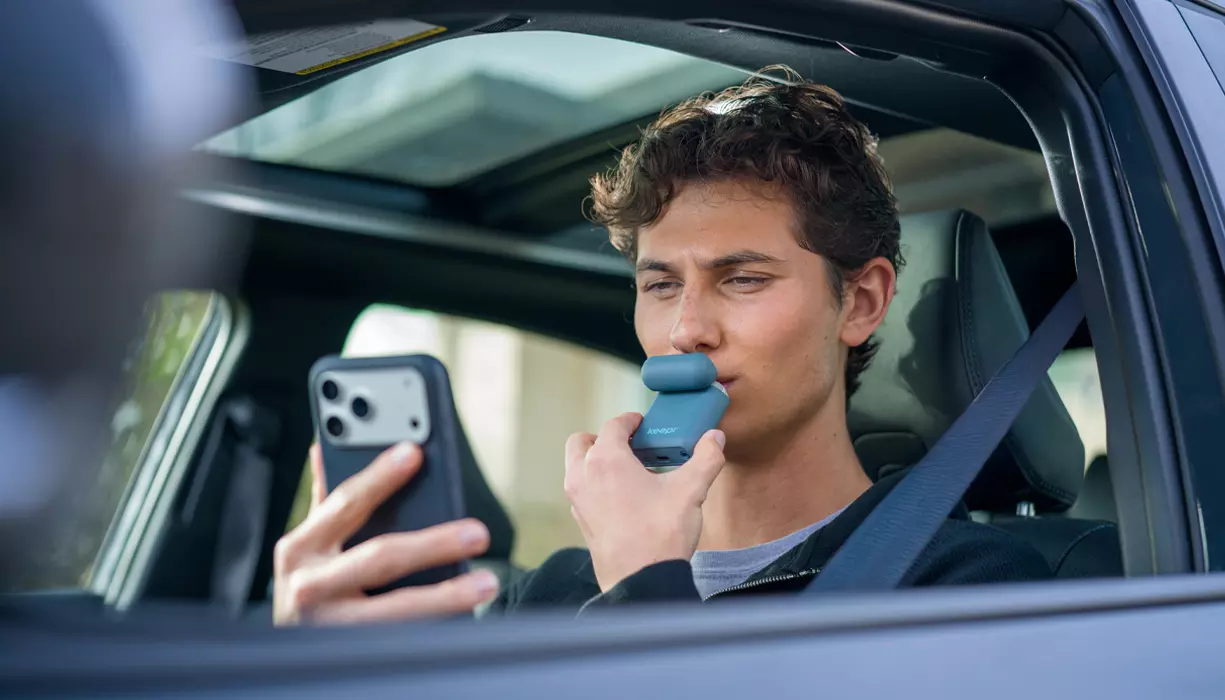
Keepr Drive® connects an easy-to-use, pocket-sized breathalyzer to a vehicle’s ignition.

When Keepr Drive is enabled, the vehicle starts only after a breath sample below a limit set by a parent or accountability partner. Keepr Drive gives you a clear result so you and your teen can decide on alternate transportation. The device offers discreet, easy testing and provides a result in seconds, helping you and your teen make more informed decisions.
Keepr is owned and operated by Consumer Safety Technology, LLC and is part of the Mindr family of brands which includes Intoxalock, DUI.org, and Breathe Easy Insurance Solutions.
Teen DUI insurance can be costly, and a DUI comes with several other consequences, so giving your teen another way to protect themselves and others is a vital part of helping them make good decisions.
Black Boxes
Black boxes, or telematics devices, collect information about how your teen drives. They can record things like speed, acceleration, braking, mileage, and how long a trip takes.
You can use that information to have important conversations about behavior behind the wheel.
Dash Cams
Dash cams record video around a vehicle and sometimes inside it. They can show what happened if there’s an incident.
Before you install a dash cam, check your state’s laws about recording audio or video of people inside the car.
GPS Trackers
GPS trackers show your teen’s vehicle location and can give you info on trip history, too.
You can use GPS data to know where your teen is, when they got there, and the route they took. Some GPS trackers can also monitor speeding, so you can identify unsafe driving habits.
Focus Apps
Focus apps silence notifications while the vehicle is moving, and some restrict certain phone functions. Pair them with a rule that the phone stays out of reach.
Smart Keys
Smart keys are programmable keys that let you set limits, such as a top speed or maximum radio volume, whenever your teen drives with that key.
That can mean an additional layer of supervision through a parental app while your teen gains experience, even when you’re not in the car.
Safe Driving Apps
There are several apps to encourage safe driving in your teen, including those that monitor speed, braking, acceleration, phone use, and more.
When you’re choosing one, check what it does, whether it works with your vehicle and your teen’s phone, whether it requires a subscription, and how accurate it is.
Speed Assist Devices
Speed assist lets a driver know when they drive faster than a set limit. Some vehicles have this feature built in.
You can also use smartphone connections or GPS options to help keep your teen aware of their speed without you needing to monitor their trip.
How to Choose the Right Safe Driving Tech for Your Teen
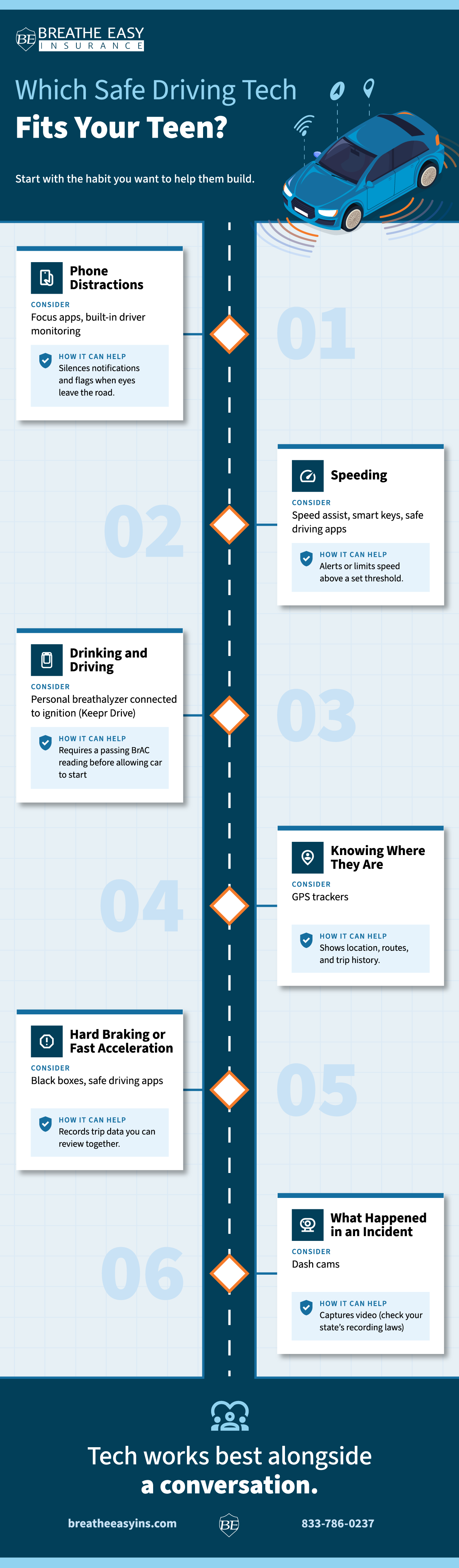
When you’re looking for safe driving tech, focus on the specific behaviors you need to address. For example, if you’re primarily worried about distraction, a focus app is likely a better choice than a GPS tracker.
Also consider ease of use, cost, privacy, and whether your teen understands how the tech works. Most importantly, take time to explain to your teen why you’re using the technology in the first place.
If they see it as part of learning to drive safely, they’ll probably feel better about it than if they see it as surveillance or feel you don’t trust them.
Do Any Cars Come Equipped with Safe Driving Tech?
Many newer cars have driver-assistance features that can make your teen feel safer on the road and help protect them as they learn. These systems make it easier for your teen to respond to hazards, maintain a safe following distance, and stay in their lane.
While they offer an extra layer of protection for a new driver gaining experience, they aren’t a replacement for paying attention behind the wheel. As a parent, make sure your teen understands what these advanced driver-assistance systems do, when they might not work, and how to respond to the vehicle’s warnings.
Automatic Emergency Braking
Many vehicles pair it with a forward collision warning, which alerts the driver to brake first. Depending on the vehicle, AEB may help avoid a crash or only reduce its severity. Depending on the vehicle, some systems brake automatically to help avoid a crash or reduce its severity. Some systems can also detect cyclists or pedestrians, but the capabilities vary widely between vehicles.
The biggest limitation is that these systems aren’t designed to prevent every crash. Sensors can struggle in low light, bad weather, or unusual road conditions, and some may have trouble detecting certain kinds of objects. The system can also produce false alerts or brake when the driver isn’t expecting it. Your teen shouldn’t assume the vehicle will stop for them, and they still need to watch the road and be ready to brake.
Before your teen drives alone in a car with this feature, show them what the AEB warning sounds and looks like. Explain that this is a backup system, not self-driving. The owner’s manual can explain which settings you can adjust, what the system detects, and how speed and conditions affect it.
Lane Assist
Lane departure warning alerts your teen when they drift out of their lane. Lane keeping assist goes a step further and gently steers back.
Lane assist systems rely on cameras and sensors to locate lane markings and the road edge. If the markings are faded, absent, or not visible due to heavy rain, snow, leaves, or debris, the system may not work as designed. Construction zones, curves, changing road layouts, and other factors can also affect it. Some systems alert you when you change lanes without signaling. Depending on the make and model of your vehicle, alerts may be very sensitive. Check the owner’s manual to see whether you can adjust the feature, so you don’t have to turn it off.
Your teen should understand how active steering assistance feels before they drive by themselves. Letting them practice on familiar roads can help them see how the system works and understand it’s not a fail-safe. They should keep their hands on the wheel, use their turn signals, watch the road, and make their own decisions about steering.
Cruise Control
Cruise control maintains a set speed. Newer vehicles with adaptive cruise control (ACC) also adjust speed based on the traffic in front of them. Your teen should understand they still need to monitor the road and stay in control of the vehicle, because these systems are designed to be helpful, not to fully operate the vehicle for the driver.
Most adaptive cruise control systems don’t respond to traffic lights or stop signs and may not react to sharp curves or objects in the road. Even when it’s active, your teen driver will need to be responsible for watching traffic, braking and accelerating when needed, and steering the vehicle to stay in its lane and avoid other vehicles.
When a teen is new to driving, they need to learn basic following-distance and speed-control skills before using ACC. As they gain experience, let them use adaptive cruise on roads they know, and make sure they know how to cancel the system to quickly take full control of the vehicle. Many of these systems let you adjust the following distance, but a longer ACC following distance isn’t a substitute for watching the vehicles ahead and being prepared to adapt to changes.
Driver Monitoring Systems
Driver monitoring systems monitor the driver for signs of distraction and issue an alert when they can’t confirm that the driver is paying attention. They use steering wheel input, sensors, and a camera aimed at the driver to determine whether that driver is paying attention. Driver monitoring isn’t perfect, and systems don’t always recognize every type of distraction. Vehicles also differ in the warnings they issue and the thresholds they use for those warnings. A driver can be “zoned out” and looking at the road without really paying attention. Glasses, sunglasses, or lighting can sometimes trigger false warnings.
Remind your teen that the system is designed to reinforce good habits, not police their driving, and that driving distracted until the warning pops up is never safe. Both hands on the wheel and eyes on the road are best. They should pull over if they need to text, are tired, or need to adjust something in the vehicle that requires more than a glance. Show your teen the driver-facing camera, what it looks for, and what might cause it to malfunction, so they can be as safe as possible on the road.
Can I Combine Safety Apps and Tech with Existing Car Features?
You can generally use smartphone apps or aftermarket technology with a vehicle’s built-in safety features, but you may get multiple alerts if the systems overlap. You may need to adjust settings to compensate for overlap, depending on what systems your teen’s car has and the additional tech you’re using.
Teach your teen that extra technology shouldn’t lull them into a false sense of security. Driver-assistance features can help in an emergency and with some driving tasks, but they aren’t a replacement for attention, experience, and care behind the wheel.
Protecting Your Teen Driver’s Privacy with Safety Apps and Tech
Read the privacy policy of any tech you use. Also, talk with your teen about monitoring, so you have clear boundaries that show trust while protecting your teen and others on the road. In January 2026, the Federal Trade Commission (FTC) finalized an order that bars GM and OnStar for five years from sharing driving data with consumer reporting agencies, after allegations the data was sold and used to influence insurance rates.
Encouraging Safer Driving Habits in Your Teen
The most effective safety strategy is the one your teen understands and follows. If you use technology as a conversation starter rather than something that feels like surveillance or a mistake-catcher, it’s likely your teen will be more receptive to taking driving safety seriously.
If your family is dealing with a DUI and needs SR-22 or FR-44 insurance, talk to a licensed specialist who understands your situation at (833) 786-0237. You can also use Breathe Easy’s Knowledge Center as a resource for teen driving and other helpful on-road tips.
FAQs About Safe Driving Tech for Parents and Teens
These FAQs are not considered legal advice. Always consult a qualified DUI attorney to assist with drunk driving charges. If you have immediate questions about SR-22 insurance, call a Breathe Easy licensed insurance agent at (833)786-0237.
How do apps and tech help my teen drive safer?
Apps and tech can reduce distractions, provide reminders to stay in their lane or keep their eyes on the road, give you location information, and monitor your teen’s driving behaviors. Combined with your conversations about safe driving, these tools can help reinforce good habits.
How do I know if my teen needs safe driving tech?
Think about your teen’s experience level, any behaviors you need to help them address, and your expectations for their driving. You don’t need all of the gadgets and apps out there, so choose the options that address specific safety concerns.
Can my teen figure out how to disable safe driving tech?
Some technologies can be bypassed or disabled, so it’s essential to understand the controls on any device you choose and discuss expectations with your teen. Also, periodically check the system to ensure it’s working as intended.
How can I encourage my teen to use safe driving tech?
Involve your teen in selecting the tech and explain its purpose, so they see it’s focused on safety, not punishment. Also, set clear expectations about what information you’ll collect and how you’ll use it.